Unity Rhythm Game Project Test - Heartfelt Fancy (autoplay)
4,210 views · Published 4 February 2015 · 2:36 · Indexed 10 October 2026
Channel: PROGUY101 · 2015 · Gaming
It's been a long while since my last upload. So I guess this is a way of saying this is what I've been doing lately.

This is a rhythm game project I've programmed using Unity. It's still in the works, but I might get this done someday. This project would be made specifically for PC only.

So how does this work theoretically? The blue and blue-green notes are the normal notes. These notes are to be hit with the keyboard keys. Gamepad integration is also possible, so I may find a way to do that sometime.

The yellow notes can't be hit with the keyboard. Instead, a "catcher" (currently a yellow rectangle at the bottom) will pop up right before the appearance of yellow notes. This catcher can only be moved with the mouse. Move the mouse horizontally to move the catcher in either direction.

I've also planned one more type of note to include, but I'm not yet sure how to do this one. I guess you'll need to wait before I can reveal this one.

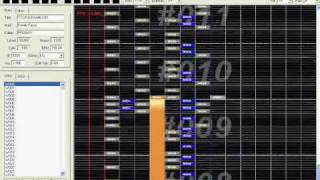
Finally, I've made an in-game working chart editor that allows to create and edit charts. It's a little buggy and it's not pretty-looking, but it's functionable. Saving the chart seems to dupe some objects though.

...

But of course I should explain what this video is about. This chart is simply created by me using said editor. The song I made the chart for is Heartfelt Fancy, which is composed by ZUN. The song is from Touhou Chireiden ~ Subterranean Animism. (Obviously this is for demonstration purposes and will not be included in future versions. Consider it a placeholder if you want.)

The chart is being autoplayed currently because I'm still working on input, hence the teleporting catcher. lol

Also 60 FPS test.

Latest version of the game here:
https://www.youtube.com/watch?v=NDdEiRwYTTY
More from this channel
-
 1:00
StepMania Party (StepMania - Garden Party)
1:00
StepMania Party (StepMania - Garden Party)
-
 1:53
Ximer 3O Nonac - TSO Maj2O (O2Jam OST Canon O3 Remix Reversed)
1:53
Ximer 3O Nonac - TSO Maj2O (O2Jam OST Canon O3 Remix Reversed)
-
 2:35
O2Jam - G59 NX4 Full Combo (AngelJam private server)
2:35
O2Jam - G59 NX4 Full Combo (AngelJam private server)
-
 2:17
StepMania - LEVIATHAN (Beta chart)
2:17
StepMania - LEVIATHAN (Beta chart)
-
 2:21
O2Jam - TSUHSUIXAMUSH (o2ma4024)
2:21
O2Jam - TSUHSUIXAMUSH (o2ma4024)
-
 2:39
O2Jam - Chik Habit ("Made-for-fun" Difficulty)
2:39
O2Jam - Chik Habit ("Made-for-fun" Difficulty)
-
 2:11
Super-high Level generated by the NoteTool
2:11
Super-high Level generated by the NoteTool
-
 4:14
AngelJam Notecharting Event Round 1 Results (Mendes by Humanoid)
4:14
AngelJam Notecharting Event Round 1 Results (Mendes by Humanoid)