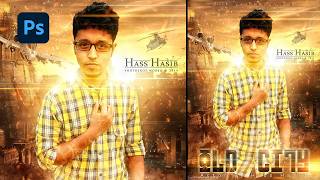
Photoshop Tutorials | Photo Manipulation with Light Effect
4,432 views · Published 17 December 2016 · 24:35 · Indexed 10 November 2026
Channel: Hass Hasib · 2016 · Education
SUBSCRIBE for more Photoshop tutorials ► http://goo.gl/iuL0Xh

In this tutorial, I will show you to how to create a dreamy scene with beautiful color effects So here you will learn to change background and putting some fake sun rays to create seamless photoshop manipulation using adjustment layers, camera raw and finally used nik software.


Resources Link:  http://www.hasshasib.com/photoshop-tutorials-photo-manipulation-light-effect/

Subscribe and get the latest tutorials:

Website: http://www.hasshasib.com

Website 2: http://www.psdtutorial.net

Facebook: https://www.facebook.com/official.hasshasib/

Twitter: https://twitter.com/hass_hasib

Google+: https://plus.google.com/u/0/+iamhasib

DeviantART: http://hasshasib001.deviantart.com/

Youtube: https://www.youtube.com/channel/UCbu-Lu9mfKXHpDzLrneJmUg

Portfolio: https://www.behance.net/HassHasib

photoshop tutorials
photoshop tutorials cs6
photoshop tutorials free
photoshop tutorials youtube
photoshop tutorials photo effects
photoshop tutorials 2016
photoshop tutorials in hindi
photoshop tutorials video
photoshop tutorial bangla
photoshop tutorial effects

Thanks For Watching.. :)
More from this channel
-
 4:45
How to Create Cinematic Black & White Portraits in Photoshop
-
 11:43
Movie Poster design in Photoshop Tutorial - Photo Manipulation
-
 34:00
Dispersion Effect in Photoshop - Photo Manipulation Tutorial
-
 1:27:08
Design a Scary Horror Movie Poster in Photoshop | Photo Manipulation Tutorial
-
 18:32
Create Stunning Action Movie Poster Effects in Photoshop
-
 17:48
How to Create a Movie Poster in Photoshop | Photoshop Tutorial
-
 14:52
Floating island photo manipulation - Photoshop tutorial
-
 8:39
Multi-Hand Creative Photo Manipulation in Photoshop | Step by Step Tutorial