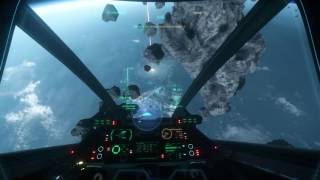
Star Citizen 2.6.3 Pre-Flight Check Before PTU 3.0 (P-52 Merlin & Gemini Inflight landing) 4K UHD
405 views · Published 9 October 2017 · 49:52 · Indexed 29 October 2026
Channel: Sitarow · 2017 · Gaming
Best viewed at Quality setting 4K UHD.

To avoid the preflight check, feel free to jump to the 00:07:00 min mark or continue reading;

P.S. Don't Text and Drive :D

As everyone knows 3.0 PTU release is close at hand. Before we welcome the 1st wave of 3.0 PTU participants. I wanted to take this opportunity to do one last video using 2.6.3 release state of the Advanced Camera Controls (Director Mode) feature.

The side mission for this pre-flight test was in preparation for an attempt to use the P-52 Merlin and recover an unmanned Starfarer at 25m/s  speed collision course with a moon during planetary grid transition in the upcoming release of 3.0. "FOR SCIENCE"

I hope that you enjoy this the future demonstration in 3.0 as I look forward to enjoying time with you all in the verse.

In this video I will be setting a unmanned  Starfarer on cruse at 25m/s. Followed by attempting to land a P52-Merlin in the cargo bay with a  in flight. (I've done it before 2.6 and hope it still works!)

I will then set off to yela and attempt to find big benny's  stonehenge site or bust while doing all the camera controls.

So you can see what goes into setting up the shots using the existing rendition of the Advanced Camera controls I set the microphone has been set to pick up the audible input clicks of the keyboard and mouse.

Understandably with an already difficult task of managing a live stream on twitch. Thee Advanced Camera Control System in its present state remains cumbersome and takes dedication to pull off.

I hope by demonstrating the present Advance Camera Control workflow may help improve the experience for those who are developing the system and enlighten those interested in the future  profession using "The Reliant Mako - News Van".

As the project matures I would like to have the option  to use analog controls for the camera operator. Including registering camera presets that save from session to session as well as custom transition preset, register targets as well as allow for custom pan, track, focus speeds.

We have tools that allow us to set targets and do live transitions to targets via target shifts. This device allows up to 6 targets.

Live Mode for SliderPLUS - From edelkrone (not an affiliated link)
Link for example https://youtu.be/HdPIZQ2EoOg

This session done using Mouse/Keyboard and 3DConnexion 6DOF controller.

I will be posting a demo on setting up both the 3DConnexion and Tobii head/eye tracking for SC client, once 3.0 PTU 1st wave is released and no NDA.

I also chose to conduct this session using older computer hardware.

Intel i7 4770k
Nvidia 1080 Asus (NOT TI)
16GB Ram
2x 512 Samsung Pro 850 SSD hard drives.
 - one or game video capture using nvidia shadowplay
 - one for windows os and game client data.


(Question) - Did they disable engine shutoff default button 6? (Great for lowering radar footprint)

Feel free to share! :D
More from this channel
-
 9:31
Girls Night Out III for TV 1080P.wmv
-
 25:05
Live Star Citizen 2.5
-
 13:15
Live Star Citizen 2.5 Vanduul Swarm Fun 3DConnexion + Mouse Look With The Sabre
-
 23:02
Live Star Citizen 2.5
-
 16:45
Live Star Citizen 2.5
-
 8:55
Live Star Citizen 2.5 Star Citizen Port Olisar Orbiting Crusader - planetary orbital shadow
-
 18:06
Live Star Citizen 2.5 Yela Wreckage Exploration.
-
 7:55
Star Citizen Gemini Self Destruction Ship Hijack