2018 INFINITI QX60 - USB/iPod® Interface
2,947 views · Published 4 October 2017 · 1:19 · Indexed 22 September 2026
Channel: INFINITI USA · 2017 · Autos & Vehicles
"This video is copyrighted material of Nissan North America, Inc. and should not be copied, edited, or reproduced without the permission of Nissan.


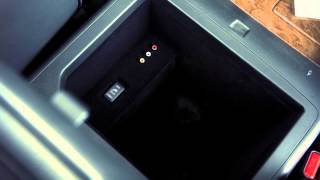
Your vehicle is equipped with two USB ports in the center console box.

Your vehicle may also be equipped with separate USB charging ports, located on the back of the center console and on either side of the third row seating. These ports are used for charging devices through a USB connection and do not interface with the vehicle’s audio system. Please see your Owner’s Manual for additional information.

Plug a compatible storage device into one of the ports in the center console box to play audio files stored on the device.

To play an iPod ®, connect the cable supplied with your iPod ®  to the USB port,
then connect the other end of the cable to your iPod ®. If compatible, the battery of your iPod ®  will charge while connected to the vehicle.

When closing the center console lid, please make sure the cord is routed through this notch to ensure lid closure and cord integrity.

Once a device is plugged into the port, press the MEDIA button repeatedly to switch to the USB or iPod ®  mode.

Please see your INFINITI InTouch™ Owner’s Manual for important safety information, system limitations, and additional operating and feature information.
"
More from this channel
-
 2:15
2013 Infiniti QX - Navigation System Overview (if so equipped) Navigation System Overview
2:15
2013 Infiniti QX - Navigation System Overview (if so equipped) Navigation System Overview
-
 0:37
2013 Infiniti QX - Parking Brake and Indicator
0:37
2013 Infiniti QX - Parking Brake and Indicator
-
 0:50
2013 Infiniti QX - Interior Storage
0:50
2013 Infiniti QX - Interior Storage
-
 1:37
2013 Infiniti M - Power Moonroof
1:37
2013 Infiniti M - Power Moonroof
-
 0:30
2013 Infiniti M - Eco Pedal System (if so equipped)
0:30
2013 Infiniti M - Eco Pedal System (if so equipped)
-
 0:50
2013 Infiniti M HEV - Hybrid Awareness (if so equipped)
0:50
2013 Infiniti M HEV - Hybrid Awareness (if so equipped)
-
 2:09
2013 Infiniti G Sedan - Steering Wheel Audio Controls
2:09
2013 Infiniti G Sedan - Steering Wheel Audio Controls
-
 0:55
2013 Infiniti G Sedan - Front Seat Adjustable Head Restraints
0:55
2013 Infiniti G Sedan - Front Seat Adjustable Head Restraints